// LED Matrix Simulator
I'm building a small LED matrix display running its own firmware. Every animation lives in a folder on disk as raw frames and a JSON manifest, and flashing the board just to check whether something looked right was slow enough that I stopped doing it as often as I should.
This runs the exact same menu and playback code as the real firmware, in the browser, against that same folder read straight from disk. Nothing is uploaded anywhere.
The real hardware uses a rotary encoder with a push button — turn it left or right to move the highlight, press it to select. These buttons (and the arrow keys/pointer) are just a way to do that from a keyboard or mouse.
How this works / limitations
Plays a one-shot intro on page load (its own boot/ folder, shipped
alongside this page), then boots straight into a default animation set, no folder
picker needed to see either working. Load your own with Install software,
pointed at either the board's
firmware/ folder (matching the real device layout — animations/
plus tiny3x5_font.json alongside it) or directly at
firmware/animations/ itself. The menu is a tree: any folder that directly
contains an anim.json is a playable entry (no chevron — it doesn't lead
anywhere else); any other folder is a submenu one level in (chevron, no other marking),
and once you're inside it a .. entry at the top goes back out — same as
list_menu_entries() in code.py. Each screen's title is the
current folder's own name (the top level shows "ANIMATIONS"). Reserved chrome names
(boot, confirm, saving, menu) are
excluded, but only at the true top level — same rule as
RESERVED_CONTENT_NAMES in code.py. A boot folder,
if present, plays once before the menu loop starts. Entries sort alphabetically by
folder name; prefix one with digits and an underscore (01_shield) to pin
its position without the prefix showing up in the menu.
↑/← = left turn, ↓/→ = right turn,
Enter/Space = select — standing in for the real board's
rotary encoder (turn to move, press to select, config.py). Moving the
highlight blinks it a few times before settling (or skips a playing animation).
Nothing happens on its own: only an explicit select acts on the highlighted entry —
play it, enter its submenu, or go back via .. — or jumps back to the
menu on the same item during playback. Sitting idle never plays or navigates
anything by itself.
The menu screen (header, pagination, chevron, arrows) is a line-for-line port of
firmware/menu_render.py operating on a 64×64 pixel buffer, not an image —
it should look pixel-identical to the real board. Animation frames are your actual
frame_NNN.bmp files decoded natively by the browser, played at the
fps/loop from each anim.json; mode: "scroll"
entries pan a tall bitmap exactly like play_scroll_animation. mode: "app"
entries run live JS instead of playing anything back — a browser-only concept for now,
with no real firmware side to port from.
The calendar app (12_calendar/) shows the title of whatever's on right now in
a shared Google Calendar, polling the Calendar API once a minute. It needs two things filled
in at the top of this page's source — CALENDAR_API_KEY and
CALENDAR_ID — which means creating a Google Cloud project, enabling the Calendar
API, generating an API key, and restricting that key (Google Cloud Console → Credentials →
your key → Application restrictions → HTTP referrers, and API restrictions → Calendar API
only) so a leaked key is only ever good for reading this one calendar's public events from
this one site. The calendar itself also needs to be shared publicly (its own Settings and
sharing → Access permissions → "Make available to public"), since there's no login here —
anyone with the page can read whatever the API key can read. CALENDAR_ID is
that calendar's ID from the same settings page (usually an email-shaped string). Left blank,
the app just says "NOT CONFIGURED" instead of failing silently.
Unlike the real board, a picked folder is a one-time snapshot — browsers can't watch a local directory for changes, so adding/removing/editing a folder on disk needs a fresh Install software click to show up here. Once you've loaded your own, Return to default switches back to the bundled set without needing to find that folder again.
JSON Typeface
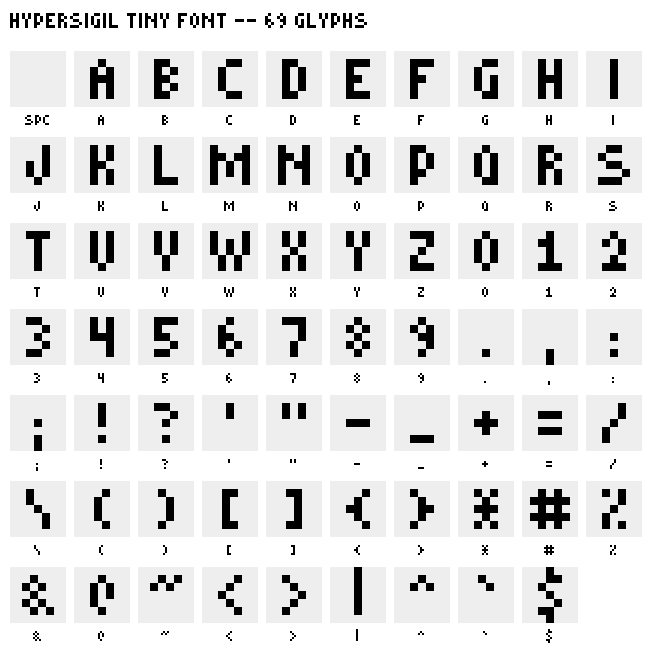
Each glyph is stored as a handful of numbers rather than a picture: cols (how many pixel-columns wide it is), cellW (how far the cursor advances afterwards, always at least one more than cols, which is what gives every character a blank column of spacing for free without any kerning logic), and seven rows, one per scanline, each just a bitmask with one bit per column. drawText walks each character, checks every bit of every row, and for each lit one paints an N×N block onto the 64×64 buffer, N being whatever scale that screen happens to be using. It's the same function drawing the menu, the clock, the timer, and this contact sheet itself.
There's no anti-aliasing or sub-pixel positioning to get right, because there's nothing to alias — every glyph is already exactly the shape it'll be on a real 64×64 LED grid, just stored as data instead of a picture. The font bundled with this page (DEFAULT_FONT, the same data this contact sheet renders) is only a fallback: pointing Install software at a folder with its own tiny3x5_font.json alongside the animations swaps every character on every screen for that font instead, no code changes needed.
To do
- No live folder watching, browsers can't do that; re-click Install software after editing anything on disk.
- Every reload needs custom software re-selected from scratch (the default set reloads on its own), the File System Access API could keep a persistent handle instead.
- No mobile-specific layout pass yet, and there's no folder picker equivalent on a phone anyway.
- Apps only exist in this simulator right now; there's no way to write one once and run it on both this and the real board, so anything built here needs a hand-written Python port to actually ship.
- The calendar app treats all-day events as local midnight-to-midnight, which can be off near a day boundary depending on time zone; and if two events overlap it only ever shows the one that starts first.
- Every visitor's browser polls the Calendar API directly with the same key, once a minute each — fine at this site's traffic, but there's no shared server-side cache if that ever stopped being true.
Changelog
2026-07-20
- Initial release: browser port of the firmware's menu and playback logic, running against a real animations folder from disk.
- Now boots straight into a default animation set (
default_software/, shipped with the page and fetched automatically) instead of an empty "Install software to begin" state. Added a Return to default button that appears once custom software has been loaded, switching back without needing to re-pick the folder. - Fixed a non-looping animation auto-advancing to the next menu item once it finished playing. It now holds on the last frame instead, same as an animation still mid-playback, so select is what actually takes you back to the menu.
- Added a one-shot boot intro on page load, played once from its own
boot/folder before the default software loads. Unlike a normal menu entry it always runs through and continues on its own rather than holding at the end, same as a realboot/folder inside a loaded firmware folder already did. - A menu label too wide for its column now scrolls on a continuous loop while highlighted, instead of just being cut off. Every other row still truncates as before.
- A scrolling label now sits still for a second before it starts moving, instead of scrolling the instant it's highlighted.
- Folders can be prefixed with digits and an underscore (e.g.
01_shield) to control menu order without it showing up in the display name; menu order was always alphabetical by folder name, this just gives a way to override it. - The top-level menu screen now reads "HYPERSIGIL" instead of "ANIMATIONS", including in the status line's breadcrumb.
- Added an "app" mode: a leaf folder with
{"mode": "app", "app": "clock"}in its anim.json runs live JS instead of playing back frames. First one is a clock (08_clock/) showing the system time as HH:MM:SS. This is simulator-only for now, there's no real firmware equivalent to port it from or keep it in sync with. - Added a second app, a countdown timer (
11_timer/). Prev/next move between HH, MM, SS, EXIT and START; select on a digit pair starts editing it (up/down arrows appear above and below it, prev/next now change the value, select confirms); select on START begins the countdown; select on EXIT leaves the app. When it reaches zero the screen flashes DONE (full-screen invert, same energy as the purge test animation's alarm flash, not a literal copy since purge is a graphic and this is text) until dismissed. - Select now cancels a running countdown, back to the EXIT/START screen, instead of only being able to run it out to zero.
- Fixed cancelling a countdown reverting the display back to the originally-set time. It now shows whatever was actually left when select was pressed.
- Moving between HH, MM, SS, EXIT and START now blinks the highlight a couple of times before settling, same as moving the highlight in the main menu, instead of snapping to it instantly.
- Incrementing a value now blinks only the up arrow, decrementing only the down arrow, instead of both blinking together regardless of direction. The other arrow stays visible throughout. Value itself still changes immediately, the blink is just feedback.
- Pressing select to confirm a value now blinks the segment's highlight twice as it drops back into navigate mode, same feedback as moving onto it.
- Fixed the digits jumping position when START was pressed: setup and countdown now both use a true vertical centre on the screen, same position either way. The up/down arrows moved down to match (they're positioned relative to the digits, not a fixed spot); the EXIT/START row stays exactly where it was.
- Fixed new default-software content (like the clock and timer apps) not showing up on the live site for up to 48 hours after uploading. The server sends manifest.json with a long cache lifetime, so a plain reload could keep serving the browser's old cached copy indefinitely; it's now fetched with a cache-busting query string so every page load asks the server fresh.
- Added a Typeface section with a contact sheet of all 69 glyphs and a couple of paragraphs on how the font is actually rendered.
2026-07-21
- Renamed the Prev/Next buttons to Left turn/Right turn, and added a note under the controls that the real hardware navigates with a rotary encoder and push button — these buttons, the arrow keys, and the pointer are all just a stand-in for turning and pressing that.
- Renamed Select to Push, matching the rotary encoder's own button.
- Removed the breadcrumb trail from the status line (it was simulator-only, the real device has no such display) and moved the Left turn/Push/Right turn buttons up to sit directly under the screen instead of below the status line.
2026-07-23
- Added a third app, a shared Google Calendar viewer (
12_calendar/) showing the title of whatever event is on right now, polling the Calendar API once a minute. Needs an API key and calendar ID filled in at the top of the page's source to work — see "How this works" above for the full setup; it just says "NOT CONFIGURED" until then.
I'd love to tell you more. Let's work together.